# 3.1 Textmodule verwalten

<p class="callout info">Zu finden im ADMIN Bereich unter Dokumentation/Textmodule</p>

<span style="font-size: 11.0pt; line-height: 150%;">Um die Dokumentationszeit zu verkürzen, gibt es die Möglichkeit, Textmodule zu erstellen. Im Folgenden wird die Vorgehensweise Schritt für Schritt erklärt.</span>

[![image.png](https://kb.garrio.de/uploads/images/gallery/2026-11/scaled-1680-/njPpktt7OdCFp8Uj-image.png)](https://kb.garrio.de/uploads/images/gallery/2026-11/njPpktt7OdCFp8Uj-image.png)

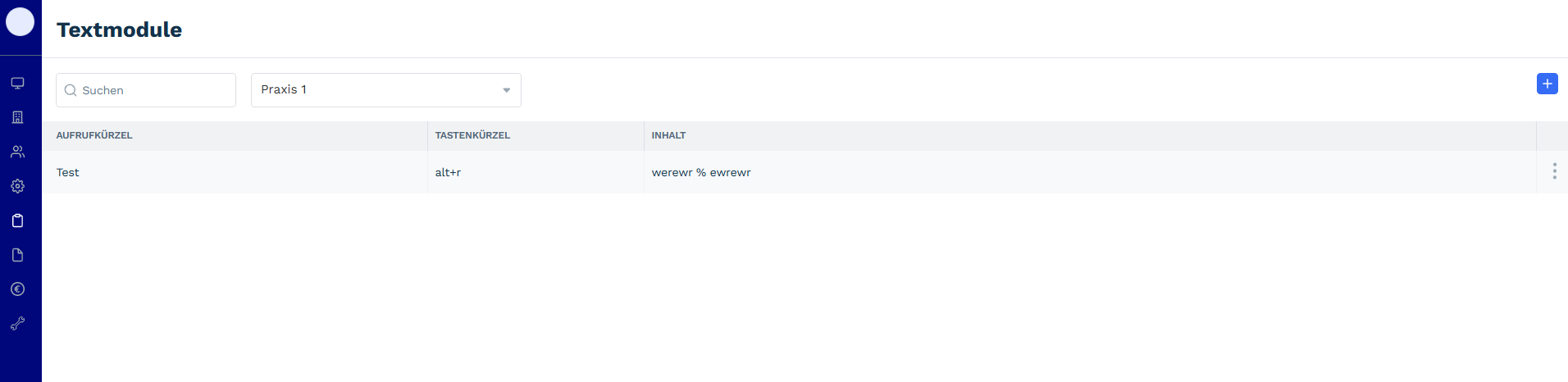
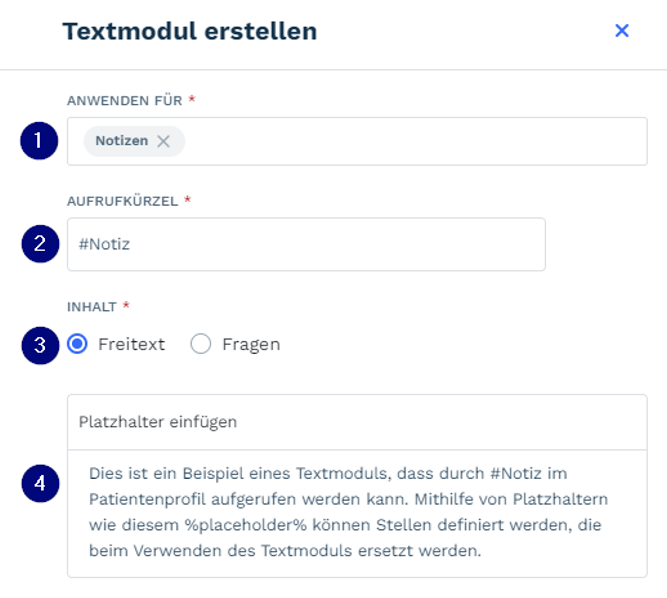
<span style="font-size: 11.0pt; line-height: 150%;">Um ein Textmodul zu erstellen, öffnet man im ersten Schritt die garrioPRO Admin Website und klickt in der Menüleiste auf den Reiter **Textmodul**. </span><span style="font-size: 11.0pt; line-height: 150%; mso-bidi-font-family: Arial; color: black; background: white;">Daraufhin öffnet sich die Übersicht über alle erstellten Textmodule. Durch Klicken auf den **+ Button** am linken Seitenrand, lässt sich ein neues Textmodul erstellen. </span><span style="font-size: 11.0pt; line-height: 150%;">Im ersten Feld ![image.png](https://kb.garrio.de/uploads/images/gallery/2025-01/scaled-1680-/F0futWPzan34esPR-image.png)</span> <span style="font-size: 11.0pt; line-height: 150%;">werden die Kategorien festgelegt, für die die Textmodule aufrufbar sind. Standardmäßig sind alle Kategorien ausgewählt. In das nächste Feld </span>![Nr 2](https://kb.garrio.de/uploads/images/gallery/2025-01/scaled-1680-/sNARd8G9BPxyne11-image.png)<span style="font-size: 11.0pt; line-height: 150%;"><span style="mso-spacerun: yes;"> </span>gibt man ein Aufrufkürzel ein, dass man beim Schreiben des späteren Dokumentes verwendet, um das Textmodul einzufügen. </span><span class="normaltextrun"><span style="font-size: 11.0pt; line-height: 150%; mso-bidi-font-family: Arial; color: black; background: white;">Nun hat man in Schritt </span></span>![Nr 3](https://kb.garrio.de/uploads/images/gallery/2025-01/scaled-1680-/6uqq9mOuQjh50tMO-image.png)<span class="normaltextrun"><span style="font-size: 11.0pt; line-height: 150%; mso-bidi-font-family: Arial; color: black; background: white;"><span style="mso-spacerun: yes;"> </span>die Möglichkeit zwischen einem Freitext oder Fragen zu wählen. Hat man sich für den Freitext entschieden, kann man im unten angezeigten Feld </span></span>![Nr 4](https://kb.garrio.de/uploads/images/gallery/2025-01/scaled-1680-/M2jYuB3CHK4imBxB-image.png)<span class="normaltextrun"><span style="font-size: 11.0pt; line-height: 150%; mso-bidi-font-family: Arial; color: black; background: white;"><span style="mso-spacerun: yes;"> </span>den gewünschten Text für das Textmodul eingeben. </span></span>

[![image.png](https://kb.garrio.de/uploads/images/gallery/2024-11/scaled-1680-/cwEOJqCLSKfSv7ue-image.png)](https://kb.garrio.de/uploads/images/gallery/2024-11/cwEOJqCLSKfSv7ue-image.png)

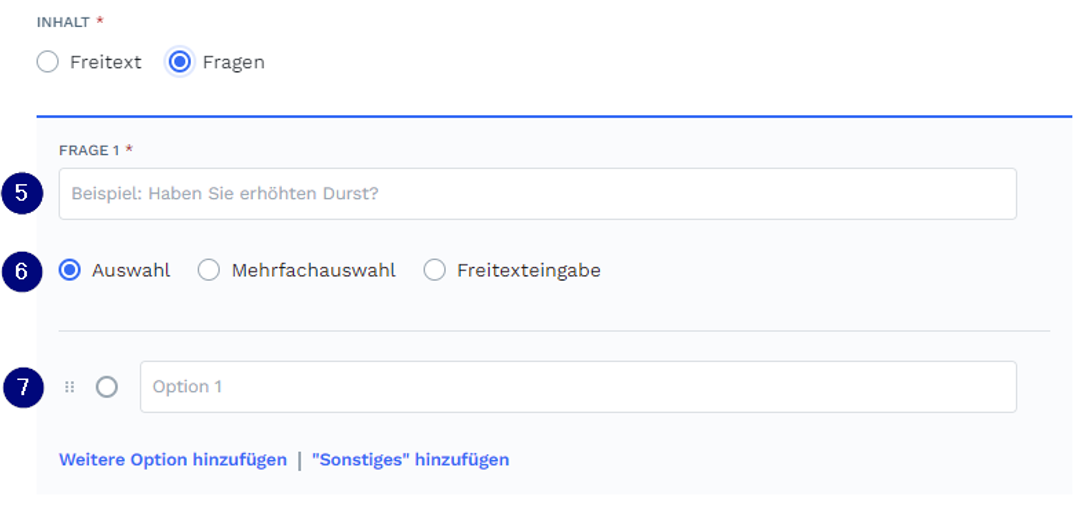
<span class="normaltextrun"><span style="font-size: 11.0pt; line-height: 150%; mso-bidi-font-family: Arial; color: black; background: white;">Wählt man Fragen aus, so gibt man in das Feld </span></span>![Nr 5](https://kb.garrio.de/uploads/images/gallery/2025-01/scaled-1680-/2XSGpghlZWvxXFXq-image.png)<span class="normaltextrun"><span style="font-size: 11.0pt; line-height: 150%; mso-bidi-font-family: Arial; color: black; background: white;"><span style="mso-spacerun: yes;"> </span>die gewünschte Frage ein. Durch die Auswahl der Antwortart </span></span>![Nr 6](https://kb.garrio.de/uploads/images/gallery/2025-01/scaled-1680-/gngz9ksvUqC1f3M9-image.png)<span style="font-size: 11.0pt; line-height: 150%;"><span style="mso-spacerun: yes;"> </span></span><span class="normaltextrun"><span style="font-size: 11.0pt; line-height: 150%; mso-bidi-font-family: Arial; color: black; background: white;">hat man die Möglichkeit, zwischen den Antwortmöglichkeiten zu variieren. Es besteht die Möglichkeit von Freitextantworten, Einfach- oder Mehrfachauswahl von Antworten. Zuletzt kann man die Antwortmöglichkeiten hinzufügen </span></span>![Nr 7](https://kb.garrio.de/uploads/images/gallery/2025-01/scaled-1680-/LeI5MvKsIf6aNRVY-image.png)<span class="normaltextrun"><span style="font-size: 11.0pt; line-height: 150%; mso-bidi-font-family: Arial; color: black; background: white;">. </span></span><span class="eop"><span style="font-size: 11.0pt; line-height: 150%; mso-bidi-font-family: Arial; color: black; background: white;"> </span></span>

[![image.png](https://kb.garrio.de/uploads/images/gallery/2024-11/scaled-1680-/epHgq826r61YgbKn-image.png)](https://kb.garrio.de/uploads/images/gallery/2024-11/epHgq826r61YgbKn-image.png)